REVENUE MONITORING FOR WORDPRESS
Your website can be online
and still be losing money.
Revenue Guard watches the WordPress flows that actually generate revenue — forms, email, WooCommerce payments and webhooks — and alerts you when something silently breaks.
WooCommerce payments are failing
A configured payment-failure threshold has been reached. Review the affected store.
Monitor the tools already running your WordPress business
WHAT REVENUE GUARD WATCHES
Uptime monitoring tells you the page loads.
Catch failures behind the page.
↗
Lead flow
Record supported form submissions and reported failures without collecting form contents.
€
Payments
Monitor WooCommerce order and payment events, with deterministic rules for observed payment failures.
⌁
Webhooks
Catch failed outbound HTTP and webhook calls to CRMs, automation platforms, ERPs and internal APIs.
✉
Email send attempts
Observe WordPress mail send errors. A successful send attempt does not confirm inbox delivery.
INSTALL. CONNECT. DONE.
Built to be configured in minutes, not days.
- 1Install the WordPress plugin
Download your plugin ZIP, upload it in WordPress, and activate it.
- 2Connect your license
Paste your license key and consent to monitoring for this site.
- 3We detect your stack
WooCommerce and supported form plugins are discovered automatically.
- 4Get alerted when revenue is at risk
In WordPress, enter your alert email, give consent and select “Save alert email”. Then select “Send test alert” and check your inbox and spam folder. Email transport acceptance is not a guarantee of inbox delivery.
IN YOUR WORDPRESS ADMIN · EXAMPLE
Revenue Guard is protecting this site
Connect your license, then send a test event to confirm communication.
View the setup guide →Every plan includes every integration.
Operational signals, without customer content.
Revenue Guard integrations
Forms
Contact Form 7 · WPForms · Gravity Forms · Elementor Forms
Fluent Forms · Ninja Forms · Formidable Forms
Forminator
WooCommerce
WooCommerce payments & refunds
WordPress Mail · WP Mail SMTP · FluentSMTP · Post SMTP
Send attempts and errors; not inbox delivery.
Infrastructure
Action Scheduler · WordPress scheduling
Bounded health checks, alerts and recovery.
Notifications
Email · Slack · Custom Webhooks
Works with Make, Zapier and n8n via Custom Webhooks.
No partnership or certification is implied.See what is connected. Know what needs attention.
The redesigned Revenue Guard panel brings your connection, detected integrations and notification channels together in WordPress.
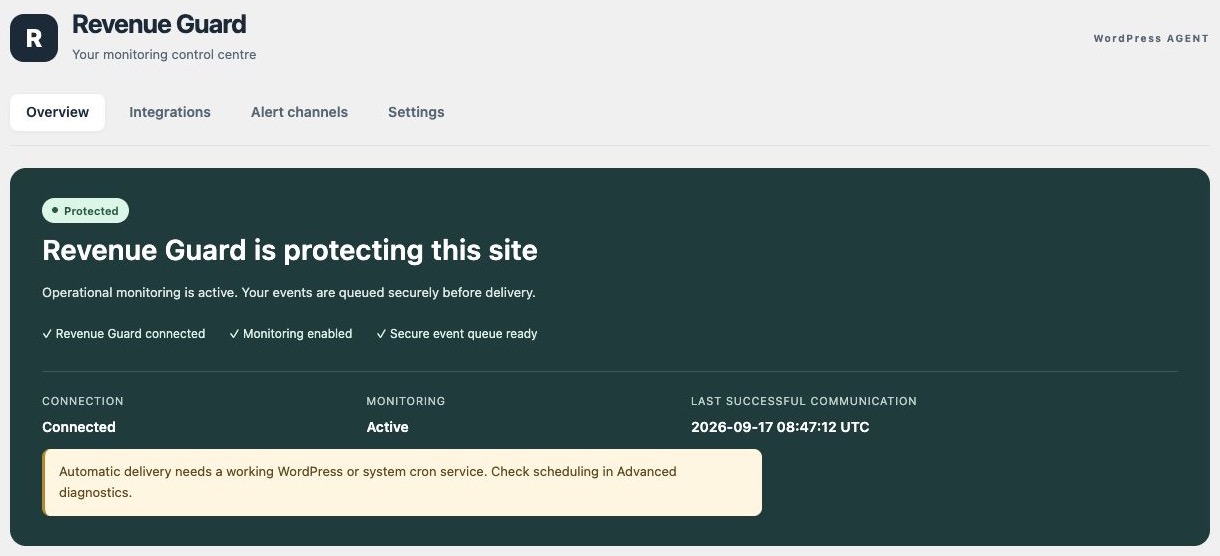
Connection and delivery
Check your connection, last successful delivery and local queue without opening technical logs.
Your integrations
See which supported plugins are detected and which are not installed. Application names stay unchanged.
Your notification channels
Review Email, Slack and Custom Webhooks separately, with an individual test for each destination.
Your WordPress language
The plugin follows your WordPress language: English, Spanish, French, German or Italian.
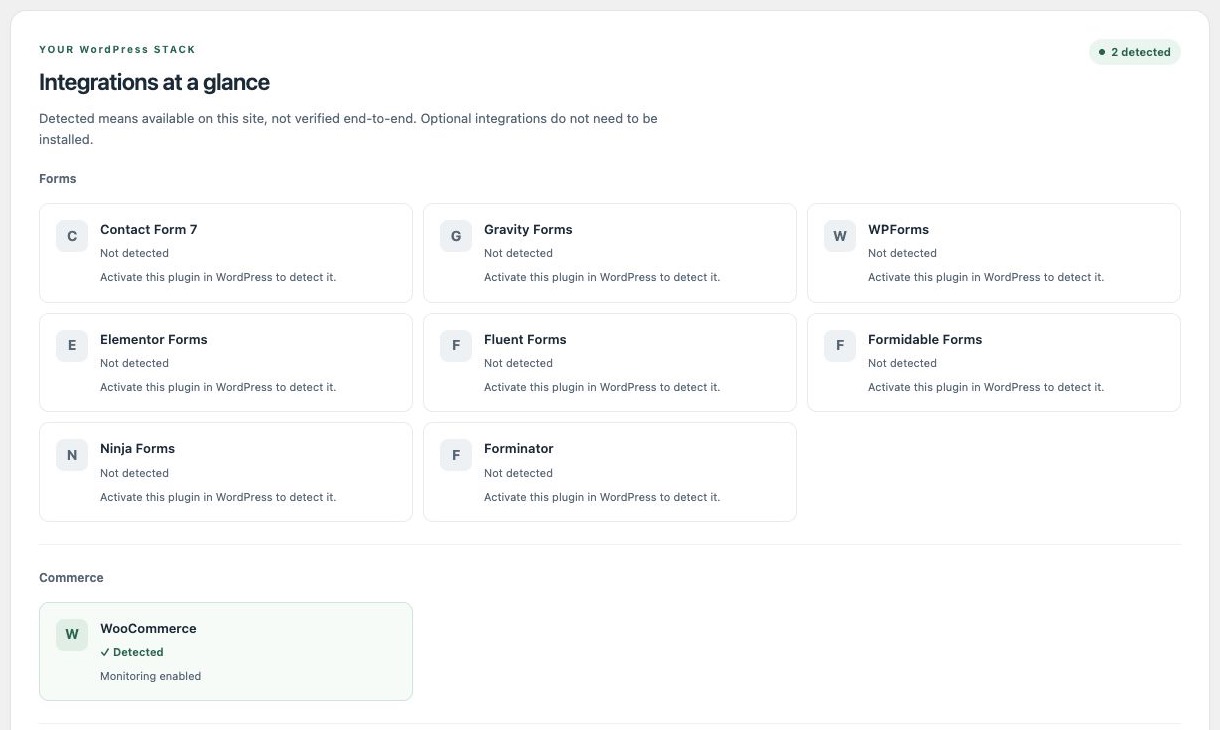
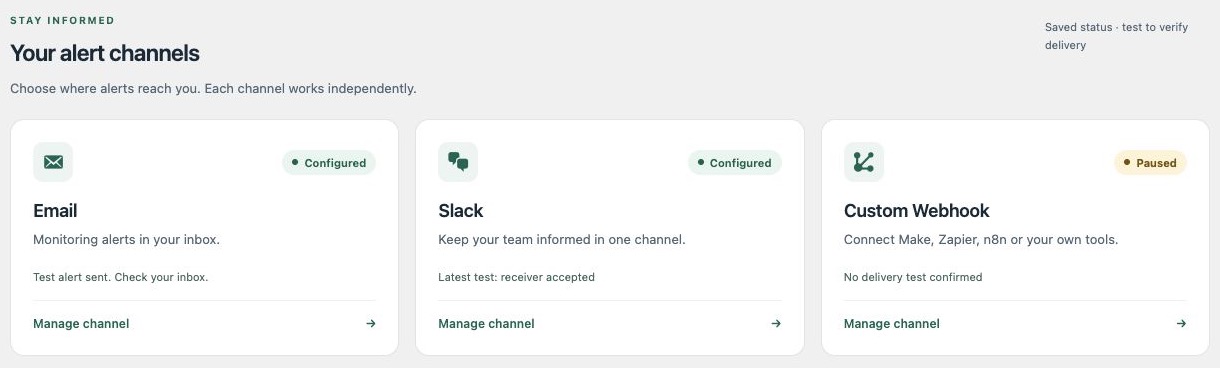
Real screenshots from a test site, shown in English. The plugin follows your WordPress language.
Included in every plan. No extra integration add-ons.
Choose the right coverage for your websites.
Save two months with annual billing.
Choose your plan and complete your purchase securely with Freemius.
Prices shown exclude applicable taxes. Freemius displays tax, the final total and renewal terms before payment. Annual prices are charged once per year; the saving compares with twelve monthly payments.
Essential
Protect one WordPress website from silent revenue leaks.
- 1 WordPress website
- Forms, mail send attempts & WooCommerce
- Failed outbound HTTP events
- Secure local event queue
- Deterministic monitoring rules
- Email alerts included
Purchasing opens soon.
Growth
Monitor up to 5 WordPress websites and catch revenue-impacting problems before they go unnoticed.
- Up to 5 WordPress websites
- Forms, mail send attempts & WooCommerce
- Failed outbound HTTP events
- Secure local event queue
- Deterministic monitoring rules
- Email alerts included
Purchasing opens soon.
Agency
Protect up to 25 WordPress websites from silent failures that can cost leads, sales, and client trust.
- Up to 25 WordPress websites
- Forms, mail send attempts & WooCommerce
- Failed outbound HTTP events
- Secure local event queue
- Deterministic monitoring rules
- Email alerts included
Purchasing opens soon.
FAQ
Questions before you connect?
What does Revenue Guard actually detect?
It evaluates observed mail errors, supported form failures, repeated outbound HTTP failures and WooCommerce payment failures. It does not submit forms, make test purchases or guarantee that every failure will be detected.
Does it collect my customers’ personal data?
Monitoring excludes form contents, customer names, customer email addresses, card details, HTTP bodies and URL query strings. It uses operational metadata, such as timestamps, status codes, amounts and hashed identifiers. Your site URL and the alert email you explicitly configure are processed separately.
Can monitoring interrupt my checkout?
The agent stores events in a local queue and sends them in the background. Collection is designed to let your forms, checkout and integrations continue if Revenue Guard is unavailable. WordPress scheduling must be working for delivery to run.
What is included in each plan?
All three plans include the same current monitoring rules and email alerts. Essential covers 1 website, Growth up to 5 and Agency up to 25. A customer dashboard, Slack, AI and automatic repairs are not included.
How do I receive alerts?
In WordPress, enter your alert email, give consent and select “Save alert email”. Then select “Send test alert” and check your inbox and spam folder. Email transport acceptance is not a guarantee of inbox delivery.
Can I cancel or move a website?
Manage renewals through the purchase information provided by Freemius. Disconnect a site to release its seat. If your entitlement becomes inactive, monitoring delivery pauses; it does not disable your website. After renewal, reconnect the original site to resume its queue.
Are taxes included?
Prices shown exclude applicable taxes. Freemius displays tax, the final total and renewal terms before payment. Annual prices are charged once per year; the saving compares with twelve monthly payments.
DON’T WAIT FOR A CUSTOMER TO TELL YOU.